









In the modern era of software development, the term “beta” doesn’t carry the same connotation it once did. Gone are the days when a beta build was synonymous with half‑baked code, constant crashes, missing features, and glaring instability. Today’s beta software — particularly in the context of Microsoft Windows — often feels as polished and production‑ready as what most people traditionally consider a final release. But can a Windows Beta truly feel like a final, fully released version? In this comprehensive deep‑dive, we’ll explore that question from every angle: historical context, real technical realities, user experience psychology, risk assessment, and even what it means for the future of operating system delivery.
This article aims to go well beyond buzzwords and surface‑level definitions, offering a professional, engaging, SEO‑optimized, and highly readable exploration of what it means for a Windows Beta to resemble a final release — or fail to live up to that expectation.
I. What “Beta” Used to Mean — And What It Means Now
Traditionally, software development followed a straightforward linear path:
Alpha → Beta → Release Candidate → Final Release
In this model:
- Alpha was unstable and never intended for regular users — internal experimentation.
- Beta was a preview that was mostly complete yet still expected to have bugs, missing polish, and rough edges.
- Release Candidate (RC) was “almost done” — the final build if no major bugs emerged.
- Final Release (GA or General Availability) was the version shipped to all users.
This textbook definition worked for decades — and it’s still how many legacy apps operate. But Windows Insider Preview builds do not fit neatly into that model anymore.
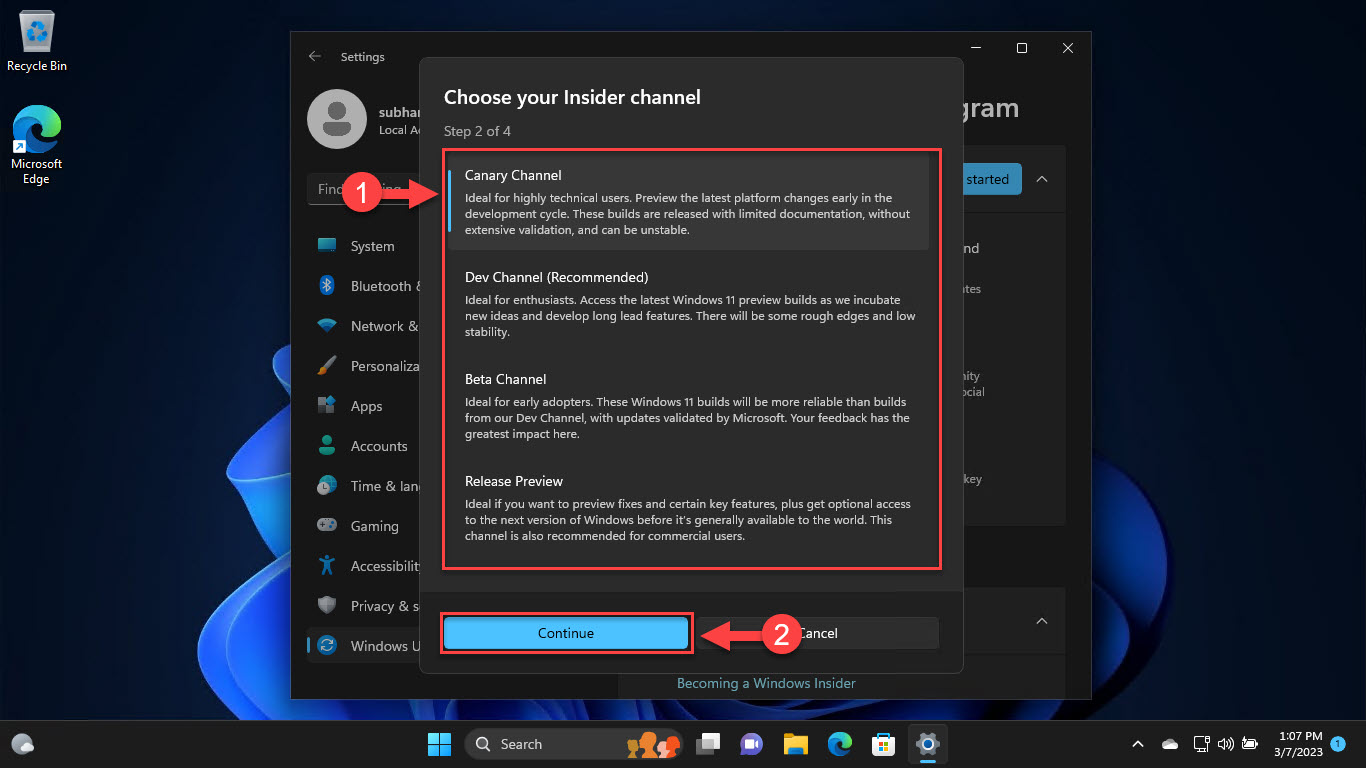
Microsoft itself defines the Beta Channel as a place that previews experiences closer to what will be shipped to general customers but still invites user feedback before the final launch.
In other words, from the outset, Microsoft positions Beta builds not simply as “rough previews,” but as polished, near‑release experiences — which is a big shift from the old definition.
II. Why Modern Windows Beta Builds Can Feel Like a Final Release
There are several reasons why Windows Beta builds can — and often do — feel like final releases:
1. They Are Tied to Upcoming Releases
Unlike bleeding‑edge Dev Channel builds, Beta Channel builds are tied to specific upcoming releases. They are not random snapshots; they represent the near‑final build that Microsoft plans to ship publicly.
This means:
- The core codebase is largely complete.
- Major features are in place.
- It’s less about experimentation and more about refinement.
This alone moves Beta builds closer to release‑quality than most traditional betas.
2. They Undergo Significant Internal Validation
Because Beta builds are intended to reflect features heading toward a public launch, they undergo more validation than Dev or Canary builds. Microsoft explicitly mentions that Beta Channel builds are more reliable and validated by Microsoft before release.
This means bugs that would normally sink a traditional beta build are typically ironed out in prior stages.
3. Controlled Feature Rollouts Smooth Rough Edges
Recent Windows Beta builds use a toggle and controlled rollout system — where new features are incrementally enabled over weeks or months rather than all at once.
This makes Beta builds:
- Less jarring to use.
- More stable on average — even though the latest features roll out gradually.
Most users only see the polished parts of a build, not the wilder experiments.
4. Many Features and Fixes Are Backported from Final Builds
It’s common for Microsoft to backport finalized or release‑ready features into Beta builds through incremental updates. This means that if a feature reaches a certain level of polish during development, it may be tested in Beta before wider public availability.
In practice, this makes Beta builds feel more like mid‑cycle releases than unfinished previews.
5. Beta and Dev Are Sometimes on the Same Base Build
Surprisingly, in recent Windows Insider releases, Beta and Dev channels have even received the same base build number with identical core components, differing mainly in which features are enabled.
This means the underlying operating system isn’t fundamentally unstable or different — it’s just flagged differently.
III. Examples: Why Beta Builds Often Feel Final
To illustrate how polished these Beta builds can be, let’s look at specific features and behaviors:
AI Enhancements and Copilot Integration
Recent Windows Beta builds have rolled out advanced AI features — including conversational Copilot access via Win + C and improvements in voice interaction tooling — directly through the Beta Channel.
This is not typical beta experimentation. These features are meant to be part of the modern Windows experience.
System Quality Improvements
Beta builds often include:
- Performance tweaks.
- UI refinements.
- Enhanced accessibility features.
- Improved stability under heavy workloads.
These are all indicators of release‑ready focus, not half‑formed experiments.
Polished System UI Elements
While some Dev builds focus on experimental UIs and radical changes, Beta builds refine and polish existing interfaces — such as search, settings panels, and system dialogs — in a manner that *feels consistent with shipped software, not a preview.
IV. Why a Beta Build Still Might Not Feel Like a Final Release
Despite all of the above, beta builds — even in the Beta Channel — are still labeled “preview” for a reason.
1. Some Features May Never Actually Ship
Even in the Beta Channel, Microsoft sometimes tries out features that never make it into the final product. Feature experimentation is still part of the process.
This means there’s always a chance that something you’re using in the Beta build simply won’t be in the final public version.
2. Controlled Rollouts Result in Uneven Experiences
Not every user sees every feature at the same time, or at all. The controlled rollout mechanism — while helpful for stability — means that two users on the same build number can have very different feature sets at any given time.
This inconsistency can make the experience feel less like a unified final release.
3. Localization and UI Polish Are Ongoing
Some Beta features may not be fully localized or refined — especially for non‑English markets — until much closer to public release.
This means that international users might encounter UI strings, labels, or help text that still need final polishing.
4. Beta Builds Still Carry Insiders Watermarks
One subtle but psychologically powerful difference is that Windows Beta builds often display watermarks or other indicators that they are not the final GA version.
Even if the build feels stable, this visual hint can condition users to treat it as something other than a finished product.
V. The Psychological Side: Why Beta Sometimes Feels Like Final
User perception of software quality is influenced by a few key psychological factors:
1. Expectation Based on Stability
Most users define “final release” not by technical criteria but by stability, lack of crashes, and daily usability. Many Windows Beta builds tick these boxes — meaning they feel like a ready‑for‑prime‑time operating system.
2. Consistency and Predictability
A build that doesn’t crash, freezes less often, and integrates nicely with hardware and apps quickly gains user trust — often leading people to mentally categorize it as final, even if it’s officially labeled beta.
3. The Confirmation Bias Effect
Once a user runs a Beta build without incident for a period of time, they may form a confirmation bias — interpreting every good experience as evidence that the build is final quality.
This is especially true when Beta releases continue to improve consistently.
VI. Risks and Limitations of Treating Beta as Final
Despite all the above, treating a Beta build as a final release can carry real risks:
1. Unexpected Bugs Still Happen
Beta builds can have showstopper bugs — and because they’re still pre‑release software, Microsoft may not address them immediately with the same urgency as a GA build.
This is especially true for edge‑case hardware setups or niche applications.
2. Compatibility Issues
Some specialized software or peripherals may not yet fully support the latest Beta API changes or system tweaks — meaning drivers, plugins, or utilities could behave unpredictably.
3. Data Risk and Telemetry Considerations
Users in the Beta Channel implicitly participate in diagnostic and telemetry data collection that goes beyond what a GA user might expect, which some privacy‑conscious users should consider carefully.
*VII. When a Beta Build Actually Is Final‑Ready
There are scenarios where your Windows Beta experience *might genuinely be indistinguishable from a final release:
1. When It’s Based on an Imminent GA Release
Occasionally — particularly when Microsoft is close to shipping a new feature update — the Beta build effectively becomes the GA build internally and is simply promoted outward.
In those rare cases, the Beta build and public release are nearly identical.
2. When Feature Rollouts Are Complete
If you are on a Beta build where all major features have fully rolled out (toggle on and graduated), then your experience is very close to what general users will see.
3. When Stability Is High and Known Issues Are Minor
Beta builds are no longer synonymous with instability. In many recent builds, the frequency of major bugs is extremely low — and minor issues often only affect a small percentage of users.
By these practical criteria, the Beta build feels final because it behaves like a final release.
VIII. What This Means for the Future of Software Releases
The evolving nature of Windows Beta builds signals a larger industry shift:
1. “Beta” Is Becoming a Living Preview
Rather than a one‑time snapshot, the Beta channel functions much like a rolling release candidate that evolves in place — often ahead of public availability.
2. Insiders Are Part of the Quality Pipeline
Software development is no longer entirely internal. Insider feedback directly shapes what ships to the public — meaning Beta builds are incubators of both quality and crowd‑tested fixes.
3. The Line Between Preview and Release Is Blurring
With modern development processes like controlled feature rollout, modular feature flags, and extensive telemetry‑driven refinement, the distinction between “beta” and “final” is fading.
IX. Conclusion: So, Can a Windows Beta Ever Feel Like a Final Release?
Yes — and often it does.
Windows Beta builds, especially in the recent Windows 11 era, are polished, stable, and in many cases indistinguishable from final releases in daily use. Microsoft’s internal validation, controlled rollouts, and feature polish make Beta builds much closer to production quality than the betas of old. However, important differences remain:
- Not all features in Beta are guaranteed to ship.
- Rollouts are uneven.
- Some UI or localization polish may still be in progress.
- Beta builds sometimes diverge from the experience of a full public launch.
In other words, a Windows Beta can feel like a final release — and for many users, it does — but it remains a pre‑release staging ground whose value is not just in previewing features, but also in shaping the final product itself.